The whole session, one scroll
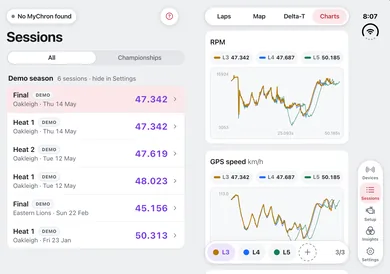
Every channel, custom-rendered to scroll fast and smooth. Flick through a full session like it’s nothing, and channels with no data tuck themselves out of the way instead of cluttering the list.
Every lap you drive, easy to see and understand.
Your MyChron already records everything. It was just never easy to look at. Racemator gets every session off it in seconds, on iPhone, iPad or iPhone Duo, and makes it easy to view, compare and understand: clear charts, track maps that answer questions, and, on Pro, AI debriefs in plain language.


Out now for iPhone, iPad and iPhone Duo.
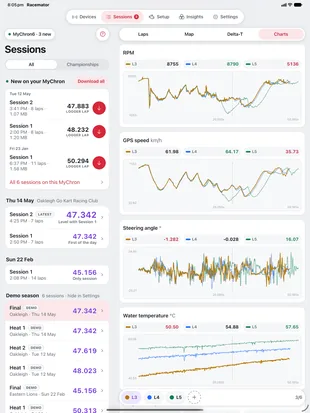
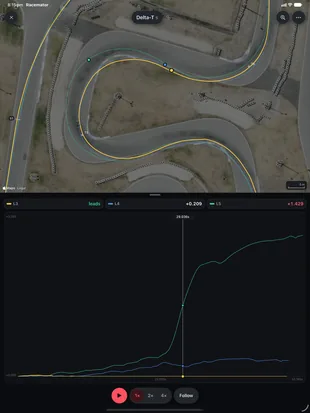
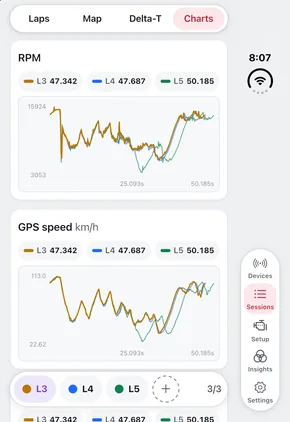
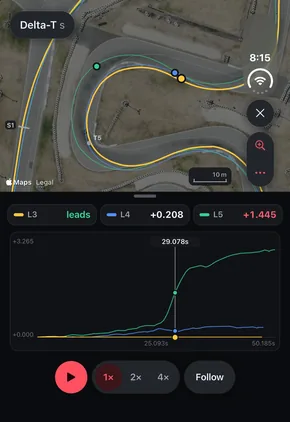
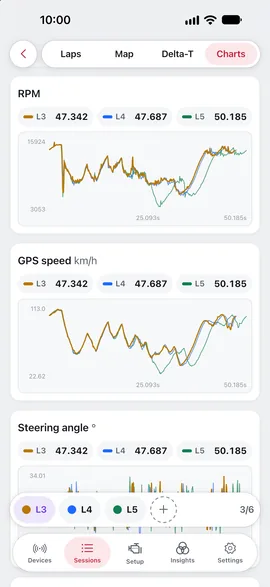
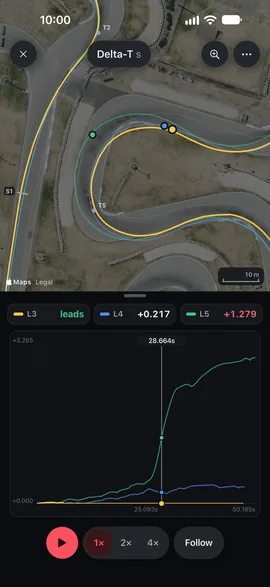
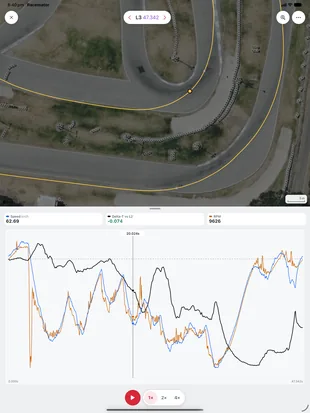
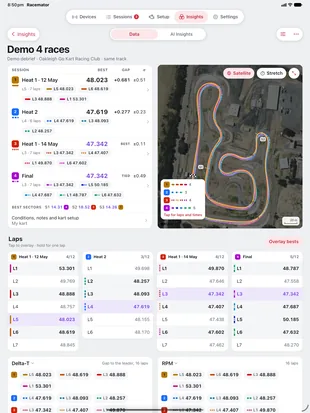
ChannelsDelta‑T Three laps overlaid, every channel in one scroll.Where the time goes, lap against lap, over a satellite photo of the track.
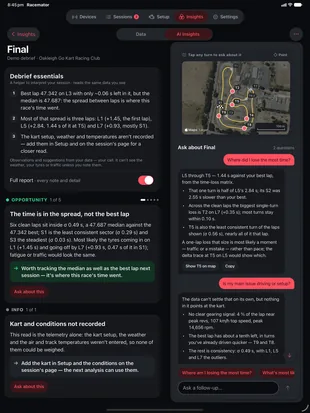
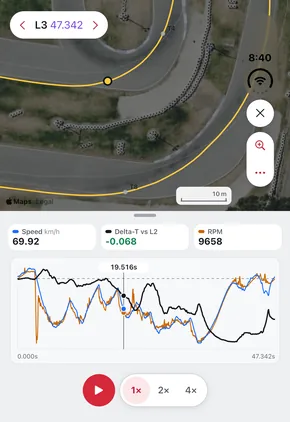
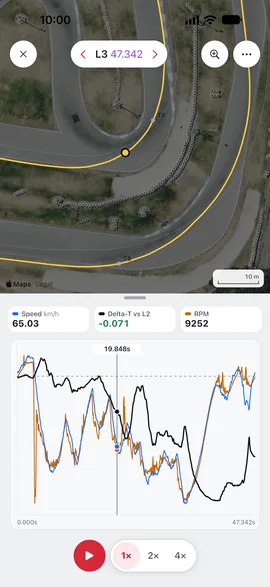
OverlaysAI debriefs One lap’s speed, Delta‑T and RPM on one graph, beside the track.What the data shows, the likely causes and what to try.
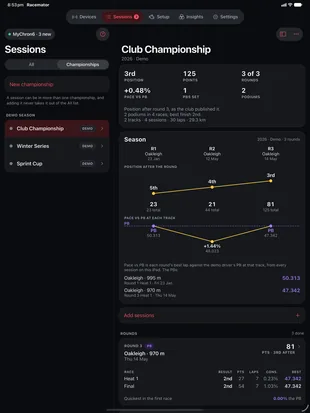
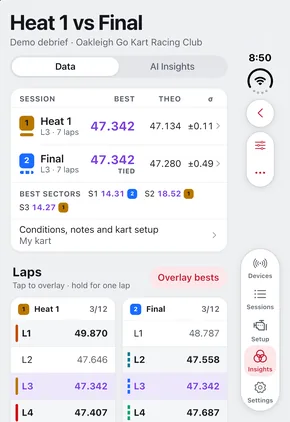
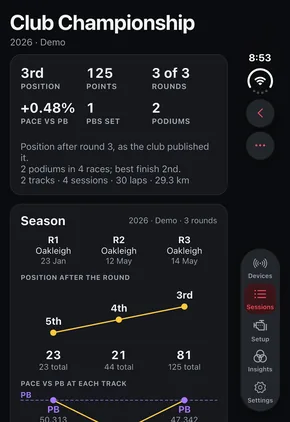
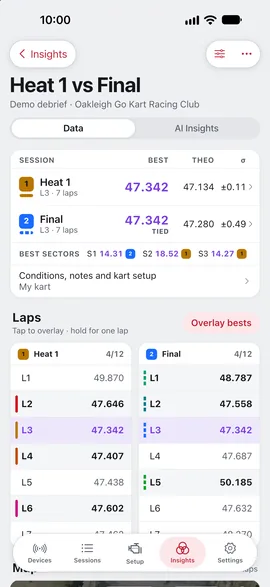
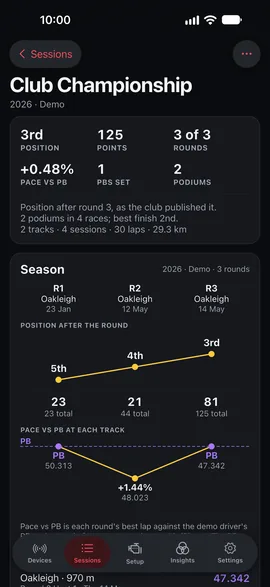
Deep diveChampionships Sessions side by side: best laps, gaps and consistency.Each round’s results and points, and your pace against your PB.
Racemator isn’t a remote screen for desktop software. It’s the whole analysis workflow, rebuilt around the device you actually have at the track.
Every channel, custom-rendered to scroll fast and smooth. Flick through a full session like it’s nothing, and channels with no data tuck themselves out of the way instead of cluttering the list.
Take any channel fullscreen with true data zoom: drag a band to zoom in, keep your bearings in the minimap, pan and pinch with two fingers, refit with one tap.
Stack laps on one trace and isolate the ones you care about. Switch channels without leaving fullscreen, and choose exactly which channels are shown.
GPS lines coloured by the data, any channel as a gradient, so fast and slow are visible at a glance. Lap-vs-lap deltas show where a lap gains or loses, and a synced cursor mirrors your finger between chart and map, with exact values as you scrub.
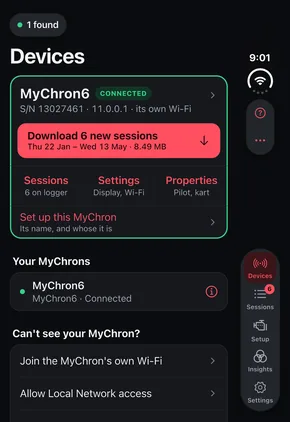
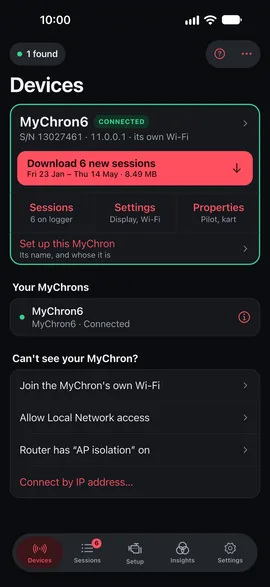
Download over the kart’s Wi-Fi in seconds. Sessions organise themselves per device, and everything works offline once it’s on your phone.
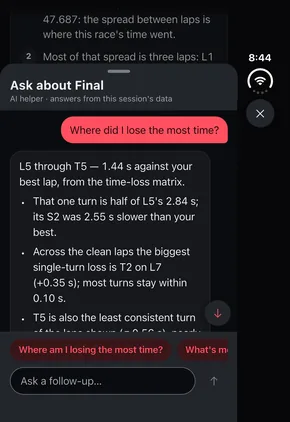
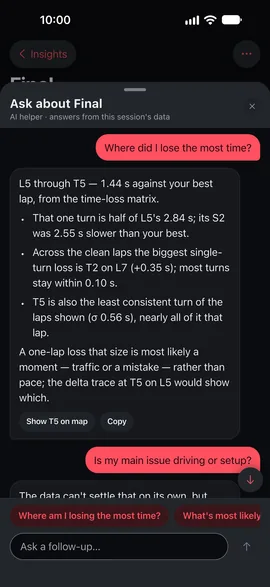
The debrief reads your laps, channels and setup notes, then explains what the data shows: which corners, which laps, and what the numbers suggest trying. Keep asking follow-ups, and point it at up to four sessions at once.
Where am I losing time?
Mostly T6. You roll in about 4 km/h slower than on lap 9 and pick up the throttle 0.2 s later, so exit RPM is down ~600 at the same mark. Most likely the entry rather than the kart: worth trying lap 9’s braking point next session.
Pick any stretch of track and see every lap through it, quickest first.
A turn’s graph and table together, with its entry, apex and exit marked.
Each update has brought more of race day into the app. These arrived since the first release, on iPhone, iPad and iPhone Duo alike.
One lap’s speed, Delta‑T and RPM on one graph beside the track, each on its own scale.
Log each round’s results with your club’s points table, and follow your pace against your PB.
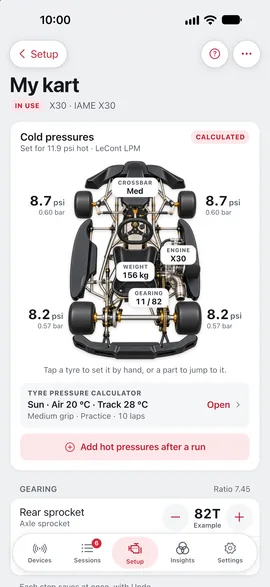
Each kart on its own page, headed by its photo: tap a tyre to set it; every change is logged, so each debrief knows what changed between runs.
Your laps over a satellite photo of the track; compared laps run side by side, each bold where it’s ahead.
What the data shows, the likely causes and what to try; a notification when an analysis is ready.
Every screen, the help and the alerts in 19 languages, from French and German to Japanese.
Download a RaceBox Mini S or Micro over Bluetooth, and open sessions from MoTeC, Garmin, Alfano, Qstarz, SpeedAngle, VBOX, GPX and more.
Your onboard footage in step with each lap, its speed and RPM beside it: scrub the graph and the video follows.
A session’s page shows the weather while you drove.
Send sessions and debriefs as a Racemator file; open session files from AirDrop, Mail or Files.
iPhone · iPad · iPhone Duo
Racemator runs on iPhone, iPad and iPhone Duo, on iOS 17 or later, and one subscription covers every device on the same Apple Account.
Race day · iPhone and iPhone Duo
Pull in, download, and read the run before the next one: the charts, the track map and Delta‑T, on the phone already in your pocket.
At home or in the truck · iPad and iPhone Duo
On the bigger screens the deep dive and the AI debrief sit beside the charts, so a whole meeting reads at once.
Pull into the pits and join the kart’s own Wi-Fi. The session is on your phone before your helmet is off, filed under the logger it came from, and yours offline from then on. Open it and overlay the laps, read the track map, or, on Pro, ask the debrief where the time went.
No laptop, no cables, no card readers, and nothing to set up beyond joining a network.
Free to connect to your MyChron and read what is already on your phone. Pay monthly for the analysis.
A$29.99/ month
Free, with no subscription: connect to your MyChron, change its settings, and read sessions already on the phone; overlay up to three laps; explore a demo season of six real races, deep dive included.
A$79.99/ month
Everything in Newbie, plus:
Prices in AUD; your own App Store charges the equivalent in local currency. Subscriptions renew monthly through the App Store. AI features are subject to fair-use limits.
Race Team
The most complete Racemator there is. Your own driver profile and karts are in Pro. Race Team adds more drivers with their karts and MyChrons, downloads from every MyChron at once, drivers compared race day by race day, meetings prepared down to the last spare chain, and a much larger AI allowance.
Your MyChrons lists every logger the team runs. Tap one to connect it, or to join its own Wi-Fi. Change one that’s out on track and the change waits for it. With two or more connected, download what’s new from all of them at once.
Trends charts every racing day at a track: the best lap, the average clean lap and how steady it was. Pick two to four drivers for Driver v Driver: each gets a line, and the standings show the gap to the quickest.
Every meeting with its venue, its times in the track’s own time zone, who’s going and its alerts, straight into Calendar or out to the whole team as a calendar file. Each driver going gets a prep list from your template, and so does the team.
Count every part and see what’s running low, then put it on To buy: tick the purchase and the stock goes up. To do and To buy lists for every race day and driver, with ticks made for a gloved thumb.
Add more drivers alongside your own profile in Pro. Each keeps their own karts and setups, and every session lands under the driver whose MyChron recorded it. Filter sessions and saved debriefs by driver, start a driver’s debrief on their own kart, and put their racer name on their MyChron.
Select the day’s sessions and tap Analyse each: every one gets its own debrief, analysed on our servers while you pack up, with one notification when they’re all ready. On our largest AI allowance.
A$299/ month
Everything in Pro for a team, plus:
Then Settings › Subscription › Race Team.
Price in AUD; your own App Store charges the equivalent in local currency. Renews monthly through the App Store. AI features are subject to fair-use limits, and one analysis runs at a time, with a queued batch beside it.
Built with drivers and coaches
We’re working with drivers and coaches to make Racemator better with every update, and your feedback shapes what comes next. Tell us what works, what doesn’t and what you’d like to see.
In the appSettings → Report a problem
The AiM MyChron 5, 5S and 6. Connect your phone to the logger over Wi-Fi and Racemator finds it. No cables or card readers. Requires an iPhone or iPad on iOS 17 or later.
Yes — downloading happens over the kart’s Wi-Fi, and your sessions, charts, lap overlays and GPS track maps all work fully offline. A few extras need an internet connection: the AI features, the session’s weather, and satellite imagery the app hasn’t saved recently.
Pull in, join the MyChron’s Wi-Fi, and new sessions download in seconds, organised per device and ready to open straight away.
Yes. Racemator downloads from a RaceBox Mini S or Micro over Bluetooth, and opens session files from other loggers and apps, among them MoTeC, Garmin, Alfano, Qstarz, SpeedAngle, VBOX and GPX. Changing a logger’s settings from the app is for the MyChron.
It speaks English, French, Italian, German, Spanish, Portuguese, Dutch, Swedish, Danish, Norwegian, Finnish, Polish, Czech and Japanese, help and alerts included. It follows your iPhone’s language, or the one you choose for Racemator in iOS Settings.
Yes. Overlay up to six laps on every chart with Newbie, or three without a subscription. Pro adds the deep dive: up to four sessions from the same track side by side, like three heats and a final, and runs the AI comparison across them.
Yes. Pro includes your own driver profile and karts. Race Team, A$299 a month, adds more drivers with their karts and MyChrons, Trends and Driver v Driver, race days with prep lists for every driver, a parts inventory with To do and To buy lists, and our largest AI allowance.
Pro includes generous daily, weekly and monthly allowances, set so that normal use never reaches them, and Race Team’s are larger still; if you do reach one, the app tells you which and when it resets. Everything that runs on the phone (charts, maps, lap comparisons, the deep dive) has no limits at all. The details are on the fair use page.
On your phone. Sessions stay on your device unless you share them yourself or use an AI feature, which sends that session’s data for analysis. The privacy policy covers exactly what’s sent and how long it’s kept.
No. It is data analysis: Racemator reads your telemetry and explains what it shows, and it can suggest things to try (including setup changes, if you tell it your setup). For coaching, work with a professional.
Yes, both, with one subscription. On iPad, sessions open beside their list, debriefs sit side by side, and the wide pages pin the track map beside the charts. On iPhone Duo, the tabs stand in the side strip when it’s closed, and open, a session sits beside its list at the fold. Android isn’t here yet, but it’s on the radar.
On the App Store, free to download for iPhone and iPad on iOS 17 or later. Connecting to your MyChron and reading what is already on your phone stay free, and a demo season of six real races, deep dive included, lets you try it without a MyChron; the Newbie, Pro and Race Team plans add the analysis.
Billing is handled entirely by Apple. Cancel any time in iOS Settings → Apple Account → Subscriptions; refunds go through reportaproblem.apple.com. On a new phone, tap Choose a plan in the app's Settings, then Restore, and your plan is back.
For quick, detailed race-day analysis, yes it does. Every channel the logger records is viewable and comparable seconds after you pull in, with a modern UI and, if you choose, AI debriefs on top. Race Studio remains the desktop suite for deep configuration work and rendering video overlays; Racemator is the tool that’s actually with you at the track, your camera’s video in step with every lap.
Free to download for iPhone, iPad and iPhone Duo · iOS 17 or later